
Tails 7.5
Changes and updates
Update Tor Browser to 15.0.7.
Simplify the home page of Tor Browser.

Update the Tor client to 0.4.9.5.
Update Thunderbird to 140.7.1.
Install Thunderbird as additional software to improve its security, if you have both the Thunderbird Email Client and Additional Software features of the Persistent Storage turned on.
Until Tails 7.5, a new version of Thunderbird was released by Mozilla only a few days after we released a new version of Tails. As a consequence, the version of Thunderbird in Tails was almost always outdated, with known security vulnerabilities.
By installing Thunderbird as additional software, the latest version of Thunderbird is installed automatically from your Persistent Storage each time you start Tails.
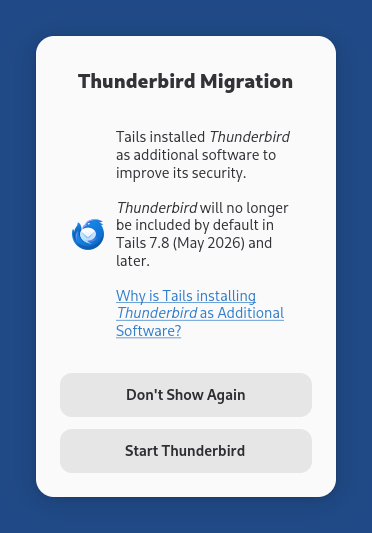
If the Thunderbird Migration dialog below appears when you start Thunderbird, it means that Tails successfully installed Thunderbird as additional software.
Include the language pack for Mexican Spanish in Thunderbird in addition to the language pack for Spanish from Spain.
For more details, read our changelog.
Get Tails 7.5
To upgrade your Tails USB stick and keep your Persistent Storage
Automatic upgrades are available from Tails 7.0 or later to 7.5.
If you cannot do an automatic upgrade or if Tails fails to start after an automatic upgrade, please try to do a manual upgrade.
To install Tails 7.5 on a new USB stick
Follow our installation instructions:
The Persistent Storage on the USB stick will be lost if you install instead of upgrading.
To download only
If you don't need installation or upgrade instructions, you can download Tails 7.5 directly: